5 Things to Verify Before You Outsource Link Building
 November 10, 2026

Picture an outsourced link report. It's a spreadsheet of domains you've never heard of, with an average DR in bold at the top. One "tech and lifestyle" blog also covers CBD gummies and roofing, and an article about wedding speeches links to your pricing page. You paid for every row, and you never saw a single link before the money was spent.
This article is for the person about to hand a SaaS company's link building to someone else. That might be an in-house link lead, a growth person, a marketing lead, or a founder who has built links alone until now. You've already decided to outsource. An agency, a freelancer or a marketplace is on your shortlist, and you're close to paying.
Most checklists stop at "ask for a sample list of sites". This one gets down to the red flags I check on each site, the article, the sentence and the anchor, and who actually puts the link on the page. I've run ClickCrab, a link building agency, since 2023, and I built LinkVendors, a marketplace. So I've seen this deal from both sides.
Each of the five checks below is something you can do before money moves. At the end there's a message you can copy and send to every vendor on your shortlist.
Outsourcing link building means handing over decisions that each cost money
You're not buying a service. You're giving someone else the call on which links your budget pays for. Each link is a yes or a no on one site, one article and one sentence, and your money sits behind every answer.
I've been building links for more than ten years. At GetFoundXL we built thousands of backlinks. There and at ClickCrab I've hired many link builders for outreach, negotiation, guest posts and link insertions. Every one of those link decisions is tied to real spend, and a series of mistakes costs money.
When you outsource, those decisions don't go away. Someone else makes them. If you can't see the decisions, you can't stop the bad ones before you've paid for them.
Agencies, freelancers and marketplaces fail these checks in different ways
It depends on who you hire. You're usually choosing between three options: a link building agency, a freelance link builder or a link building marketplace. The same five checks apply to all three, but each option tends to fall short in different places.
| Check | Agency | Freelancer | Marketplace |
|---|---|---|---|
| 1. You see the exact sites and can check them for red flags | Often a sample list. The agency picks the final sites. | Depends on the person's own contacts. Ask for the list. | You see the domain. In catalogues of 100K to 1M sites, most exist only to sell links. |
| 2. You approve the article, sentence and anchor before paying | Many agencies work from requirements agreed upfront. Some let you approve domains. | Depends on what you agree. Get it in writing. | Varies. Some show only the domain, some show the page. |
| 3. You know who places the link | Not always stated. Ask. | Usually the person you hired. Ask how they reach the site. | Depends on the marketplace. Ask who talks to the editor. |
| 4. The terms cover a link that doesn't go live | Check the contract. | Often agreed informally. Write it down. | Check the published refund terms. |
| 5. The report shows live URLs you can open | Often a summary of totals and averages. | Often a spreadsheet. Agree the columns first. | Usually a list of orders. Check what each row shows. |
Read the table as a list of things to ask, not a verdict. A good agency can pass all five checks, and a bad marketplace can fail all five. If you're still choosing between the types, I've compared them in link building services vs marketplaces.
1. You can see the exact sites and check each one for red flags before you pay
The first check has two parts. Before you pay, get the actual sites your links will go on. Then run each site through the red-flag checklist below.
A sample list of domains does not tell you which sites you will actually get
"Here are five example sites in your niche" is a sales tool. It shows what the vendor can get on a good day. It doesn't tell you where your links will end up.
The sites you actually get are picked later, often after you've paid for the month. Strong examples in the pitch and weak sites in the report is how good and bad links get mixed.
Ask for this in writing before you pay:
- The exact domains your links will go on.
- A promise that no link goes on a site outside that list without your OK.
- The article URL for each link, if the vendor already knows it.
If a vendor can only give you "sites like these", treat every link as unapproved until you've seen it.
SEO metrics work as red flags, not as hard filters
The usual checks are DR, traffic and top country. Every vendor shows them, and I use them too. But they come from models that tool companies build. They're estimates, not measurements.
"These metrics are models, so take them with a grain of salt. I treat them as red flags, not hard filters: look at the flags a site raises, then use common sense on whether it still makes sense to go ahead."
Here's why the difference matters. At one point, Ahrefs itself had India as its top traffic country. A hard country filter would have thrown out a link from Ahrefs automatically. For many teams that's a link they'd want, as long as it's relevant to their niche.
DR and top country are the first two flags to check
DR. Many buyers want very high DR, and DR 70 is the number that keeps floating around. DR is about to change, though. On 1 December 2026, Ahrefs makes DR4 its default Domain Rating model.
Sites that lean on spam-labelled links will lose points. Subdomains get their own scores instead of inheriting the root domain's DR. Ordinary sites barely move at the median. I expect the DR bar for a really nice link to come down a little, because "DR 70" won't mean quite what it used to.
Top country. For most SaaS teams, I want the US to be the site's number one traffic country. If the top country is Pakistan, Nigeria or somewhere similar, that's a flag, and in some cases India is too. It depends on who you sell to and what you want the link to do.
DR and traffic should move roughly in step
From experience, a site's DR and traffic should be roughly in sync. A site with DR 88 and around 1,000 monthly visits makes no sense. A huge brand with badly managed SEO can have a high DR and low traffic, but that's rare. Usually it means something is off, and the link gives you poor value.
Traffic value, top pages and keywords show whether the traffic is real
Traffic value. If a site's traffic value is far too low for the traffic it shows, something is wrong. Take a closer look before you go further.
Top pages. Open the site's top pages and ranking keywords. If a single article brings in almost all the traffic, the site is weaker than its traffic number suggests.
Keywords. Read the keywords the site ranks for and ask whether it's realistic that people search for them that often. SEO tools can't see Google's own data. Ahrefs, for example, blends several sources to estimate search volume, and its help centre says search volume in any SEO tool is always an estimate. One of those sources is clickstream data: browsing data collected by apps people install on their computers, then anonymised and resold to companies like Ahrefs, which use maths to estimate how popular each search is.
In my view, that data can be manipulated, and that's how random keywords end up with search volume they shouldn't have. There are many ways to do it. Tool companies like Ahrefs fight back by finding and removing anomalies, but it's cat and mouse. If a site ranks for keywords nobody would realistically search that often, treat its traffic as a red flag.
A traffic drop of 50% or more in six months needs a closer look
Check whether the site's organic traffic fell by half or more in the last six months. A drop that size is a reason to find out what happened before you pay.
On LinkVendors, a search result shows a red note when a site's traffic fell, with the dates. You see the drop next to the article and the price, before you approve anything.
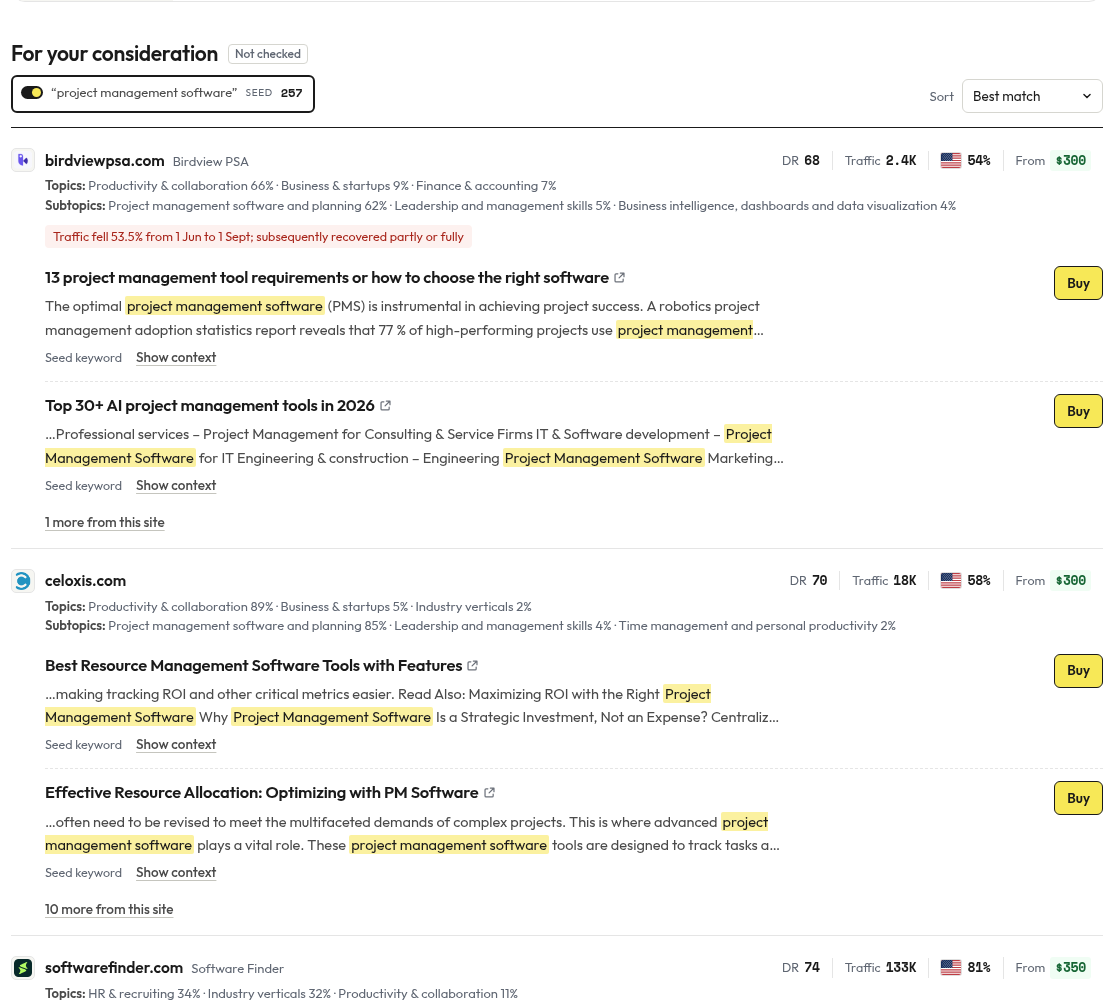
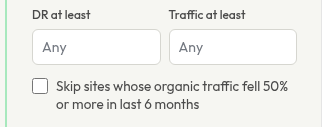
You can also leave these sites out of the search altogether. At step 2, tick "Skip sites whose organic traffic fell 50% or more in last 6 months".
To run a similar check on any site, here's a bookmarklet for Ahrefs Site Explorer users. It checks whether a site's organic traffic fell 50% or more from a peak over the last 12 months. It switches the chart to 1Y and Monthly, reads the "Avg. organic traffic" points, and shows an alert with Yes or No plus the biggest drop and its dates.
LinkVendors has this check built in as the step-2 filter above, though the filter looks at the last 6 months while the bookmarklet looks at 12. The bookmarklet relies on the layout of the Ahrefs page, so a change to the Ahrefs interface can break it.
Save the code below as a bookmark, open a domain in Ahrefs Site Explorer, then click the bookmark.
javascript:(function () { console.log('Script started'); const oneYearButton = document.evaluate( "//button[.//div[text()='1Y']]", document, null, XPathResult.FIRST_ORDERED_NODE_TYPE, null ).singleNodeValue; if (oneYearButton) { console.log('1Y button found. Clicking the button.'); oneYearButton.click(); } else { console.log('1Y button not found.'); } setTimeout(() => { const frequencyButton = document.evaluate( "//button[.//div[normalize-space(text())='Daily' or normalize-space(text())='Weekly' or normalize-space(text())='Monthly']]", document, null, XPathResult.FIRST_ORDERED_NODE_TYPE, null ).singleNodeValue; if (frequencyButton) { console.log('Frequency button found. Dispatching mousedown event.'); frequencyButton.dispatchEvent(new Event('mousedown', { bubbles: true })); } else { console.log('Frequency button not found.'); } setTimeout(() => { const monthlyButton = document.evaluate( "//button[.//div[text()='Monthly']]", document, null, XPathResult.FIRST_ORDERED_NODE_TYPE, null ).singleNodeValue; if (monthlyButton) { console.log('Monthly button found. Dispatching mousedown event.'); monthlyButton.dispatchEvent(new Event('mousedown', { bubbles: true })); } else { console.log('Monthly button not found.'); } console.log('Waiting for chart to render...'); const checkChart = setInterval(() => { const xpath = ` //div[ starts-with(@class, 'css-') and substring(@class, string-length(@class) - string-length('-box') + 1) = '-box' and .//div[ contains(@class, '-text') and normalize-space(.) = 'Avg. organic traffic' ] and not(.//*[contains(@class, '-iconLoader')]) ] `; const result = document.evaluate( xpath, document, null, XPathResult.FIRST_ORDERED_NODE_TYPE, null ); const avgTrafficChart = result.singleNodeValue; if (avgTrafficChart) { console.log( 'Avg. organic traffic chart loaded. Proceeding with data extraction.' ); clearInterval(checkChart); simulateHoverAndExtract().then((data) => { console.log('Data extracted:', data); let hasSignificantDrop = false; let maxDrop = { fraction: 0, percent: 0 }; if (data.length > 0) { let peak = data[0].value; let peakDate = data[0].date; for (let i = 1; i < data.length; i++) { const current = data[i]; const drop = (peak - current.value) / peak; if (drop >= 0.5) { hasSignificantDrop = true; } if (drop > maxDrop.fraction) { maxDrop = { fraction: drop, percent: drop * 100, from: peakDate, to: current.date, fromValue: peak, toValue: current.value, }; } if (current.value > peak) { peak = current.value; peakDate = current.date; console.log('New peak found:', { peak, peakDate }); } } } else { console.log('No data points extracted.'); } const message = [ `Traffic drop ≥50% detected: ${ hasSignificantDrop ? %27Yes%27 : %27No%27 }`, `Biggest drop: ${maxDrop.percent.toFixed(2)}% (from ${ maxDrop.fromValue?.toLocaleString() || %27N/A%27 } → ${maxDrop.toValue?.toLocaleString() || %27N/A%27} from ${ maxDrop.from || %27N/A%27 } to ${maxDrop.to || %27N/A%27})`, ].join(%27\n%27); console.log(%27Alert message prepared:%27, message); alert(message); }); } }, 100); }, 10); }, 10); async function simulateHoverAndExtract() { console.log(%27simulateHoverAndExtract started.%27); const path = document.querySelector( %27.recharts-area-curve[name="Avg. organic traffic"]%27 ) || document.querySelector( %27.recharts-line-curve[name="Avg. organic traffic"]%27 ); if (!path) { console.log(%27Avg. organic traffic path not found.%27); return []; } const pathData = path.getAttribute(%27d%27); const pointsMatch = pathData.match(/[LM](\d+\.?\d*),(\d+\.?\d*)/g); if (!pointsMatch) { console.log(%27No points found in path data%27); return []; } const svgElement = path.closest(%27svg%27); const svgRect = svgElement.getBoundingClientRect(); const results = []; for (const pointStr of pointsMatch) { const [x, y] = pointStr.slice(1).split(%27,%27).map(Number); const screenX = svgRect.left + x; const screenY = svgRect.top + y; const evt = new MouseEvent(%27mousemove%27, { bubbles: true, cancelable: true, view: window, clientX: screenX, clientY: screenY, }); path.dispatchEvent(evt); const chartWrapper = document.querySelector(%27.recharts-wrapper%27); if (chartWrapper) { chartWrapper.dispatchEvent(evt); } await new Promise((resolve) => setTimeout(resolve, 100)); const tooltip = extractTooltipData(); if (tooltip) { console.log(%27Tooltip data extracted:%27, tooltip); results.push(tooltip); } } console.log(%27simulateHoverAndExtract completed.%27); return results; } function extractTooltipData() { const tooltip = document.querySelector(%27.recharts-tooltip-wrapper%27); if (!tooltip) { console.log(%27Tooltip element not found.%27); return null; } if (tooltip.style.visibility !== %27visible%27) { console.log(%27Tooltip is not visible.%27); return null; } const dateElement = tooltip.querySelector(%27h5%27); const date = dateElement ? dateElement.textContent.trim() : null; if (!date) { console.log(%27Date not found in tooltip.%27); return null; } const candidateDivs = Array.from(tooltip.querySelectorAll(%27div%27)).filter( (div) => { const text = div.textContent.trim(); return /^\d[\d,]*$/.test(text); } ); let valueStr = null; for (const candidate of candidateDivs) { const candidateParent = candidate.parentElement; if (!candidateParent) continue; const rowContainer = candidateParent.parentElement; if (!rowContainer) continue; if (rowContainer.children.length !== 2) continue; const sibling = rowContainer.children[0] === candidateParent ? rowContainer.children[1] : rowContainer.children[0]; if (sibling.textContent.indexOf(%27Avg. organic traffic%27) !== -1) { valueStr = candidate.textContent.trim(); break; } } if (!valueStr) { console.log(%27Avg. organic traffic data not found.%27); return null; } return { date: date, value: parseInt(valueStr.replace(/,/g, %27%27), 10), }; }})();Readable version of the code (for reading, not for copying)
(function () {
  console.log('Script started');
  const oneYearButton = document.evaluate(
    "//button[.//div[text()='1Y']]",
    document,
    null,
    XPathResult.FIRST_ORDERED_NODE_TYPE,
    null,
  ).singleNodeValue;
  if (oneYearButton) {
    console.log('1Y button found. Clicking the button.');
    oneYearButton.click();
  } else {
    console.log('1Y button not found.');
  }
  setTimeout(() => {
    const frequencyButton = document.evaluate(
      "//button[.//div[normalize-space(text())='Daily' or normalize-space(text())='Weekly' or normalize-space(text())='Monthly']]",
      document,
      null,
      XPathResult.FIRST_ORDERED_NODE_TYPE,
      null,
    ).singleNodeValue;
    if (frequencyButton) {
      console.log('Frequency button found. Dispatching mousedown event.');
      frequencyButton.dispatchEvent(new Event('mousedown', { bubbles: true }));
    } else {
      console.log('Frequency button not found.');
    }
    setTimeout(() => {
      const monthlyButton = document.evaluate(
        "//button[.//div[text()='Monthly']]",
        document,
        null,
        XPathResult.FIRST_ORDERED_NODE_TYPE,
        null,
      ).singleNodeValue;
      if (monthlyButton) {
        console.log('Monthly button found. Dispatching mousedown event.');
        monthlyButton.dispatchEvent(new Event('mousedown', { bubbles: true }));
      } else {
        console.log('Monthly button not found.');
      }
      console.log('Waiting for chart to render...');
      const checkChart = setInterval(() => {
        const xpath = `          //div[            starts-with(@class, 'css-') and             substring(@class, string-length(@class) - string-length('-box') + 1) = '-box' and             .//div[              contains(@class, '-text') and               normalize-space(.) = 'Avg. organic traffic'            ] and             not(.//*[contains(@class, '-iconLoader')])          ]        `;
        const result = document.evaluate(
          xpath,
          document,
          null,
          XPathResult.FIRST_ORDERED_NODE_TYPE,
          null,
        );
        const avgTrafficChart = result.singleNodeValue;
        if (avgTrafficChart) {
          console.log(
            'Avg. organic traffic chart loaded. Proceeding with data extraction.',
          );
          clearInterval(checkChart);
          simulateHoverAndExtract().then((data) => {
            console.log('Data extracted:', data);
            let hasSignificantDrop = false;
            let maxDrop = { fraction: 0, percent: 0 };
            if (data.length > 0) {
              let peak = data[0].value;
              let peakDate = data[0].date;
              for (let i = 1; i < data.length; i++) {
                const current = data[i];
                const drop = (peak - current.value) / peak;
                if (drop >= 0.5) {
                  hasSignificantDrop = true;
                }
                if (drop > maxDrop.fraction) {
                  maxDrop = {
                    fraction: drop,
                    percent: drop * 100,
                    from: peakDate,
                    to: current.date,
                    fromValue: peak,
                    toValue: current.value,
                  };
                }
                if (current.value > peak) {
                  peak = current.value;
                  peakDate = current.date;
                  console.log('New peak found:', { peak, peakDate });
                }
              }
            } else {
              console.log('No data points extracted.');
            }
            const message = [
              `Traffic drop ≥50% detected: ${hasSignificantDrop ? 'Yes' : 'No'}`,
              `Biggest drop: ${maxDrop.percent.toFixed(2)}% (from ${maxDrop.fromValue?.toLocaleString() || 'N/A'} → ${maxDrop.toValue?.toLocaleString() || 'N/A'} from ${maxDrop.from || 'N/A'} to ${maxDrop.to || 'N/A'})`,
            ].join('\n');
            console.log('Alert message prepared:', message);
            alert(message);
          });
        }
      }, 100);
    }, 10);
  }, 10);
  async function simulateHoverAndExtract() {
    console.log('simulateHoverAndExtract started.');
    const path =
      document.querySelector(
        '.recharts-area-curve[name="Avg. organic traffic"]',
      ) ||
      document.querySelector(
        '.recharts-line-curve[name="Avg. organic traffic"]',
      );
    if (!path) {
      console.log('Avg. organic traffic path not found.');
      return [];
    }
    const pathData = path.getAttribute('d');
    const pointsMatch = pathData.match(/[LM](\d+\.?\d*),(\d+\.?\d*)/g);
    if (!pointsMatch) {
      console.log('No points found in path data');
      return [];
    }
    const svgElement = path.closest('svg');
    const svgRect = svgElement.getBoundingClientRect();
    const results = [];
    for (const pointStr of pointsMatch) {
      const [x, y] = pointStr.slice(1).split(',').map(Number);
      const screenX = svgRect.left + x;
      const screenY = svgRect.top + y;
      const evt = new MouseEvent('mousemove', {
        bubbles: true,
        cancelable: true,
        view: window,
        clientX: screenX,
        clientY: screenY,
      });
      path.dispatchEvent(evt);
      const chartWrapper = document.querySelector('.recharts-wrapper');
      if (chartWrapper) {
        chartWrapper.dispatchEvent(evt);
      }
      await new Promise((resolve) => setTimeout(resolve, 100));
      const tooltip = extractTooltipData();
      if (tooltip) {
        console.log('Tooltip data extracted:', tooltip);
        results.push(tooltip);
      }
    }
    console.log('simulateHoverAndExtract completed.');
    return results;
  }
  function extractTooltipData() {
    const tooltip = document.querySelector('.recharts-tooltip-wrapper');
    if (!tooltip) {
      console.log('Tooltip element not found.');
      return null;
    }
    if (tooltip.style.visibility !== 'visible') {
      console.log('Tooltip is not visible.');
      return null;
    }
    const dateElement = tooltip.querySelector('h5');
    const date = dateElement ? dateElement.textContent.trim() : null;
    if (!date) {
      console.log('Date not found in tooltip.');
      return null;
    }
    const candidateDivs = Array.from(tooltip.querySelectorAll('div')).filter(
      (div) => {
        const text = div.textContent.trim();
        return /^\d[\d,]*$/.test(text);
      },
    );
    let valueStr = null;
    for (const candidate of candidateDivs) {
      const candidateParent = candidate.parentElement;
      if (!candidateParent) continue;
      const rowContainer = candidateParent.parentElement;
      if (!rowContainer) continue;
      if (rowContainer.children.length !== 2) continue;
      const sibling =
        rowContainer.children[0] === candidateParent
          ? rowContainer.children[1]
          : rowContainer.children[0];
      if (sibling.textContent.indexOf('Avg. organic traffic') !== -1) {
        valueStr = candidate.textContent.trim();
        break;
      }
    }
    if (!valueStr) {
      console.log('Avg. organic traffic data not found.');
      return null;
    }
    return { date: date, value: parseInt(valueStr.replace(/,/g, ''), 10) };
  }
})();
If the bookmark stops working after an Ahrefs update, the layout changed. Until then, check the traffic chart by eye.
The outbound links show how much a link from the site is worth
Referring domains vs linked domains. A site only has so much link value to pass on. Compare the number of domains linking to it with the number of domains it links out to. If it links out to tens or hundreds of thousands of domains, each link passes less, and a poor ratio is a red flag.
This isn't a perfect metric. Some sites block the Ahrefs crawler from every page, so nobody can see how many domains they link to. A blocked crawler is a red flag in itself.
Neighbourhood. Check who the site links to. Links out to grey-niche sites are a bad sign. Sitewide links in the homepage footer or sidebar aren't a good sign either.
Heavy ads and topical drift are the advanced flags
Ads. Some people see too many ads, or very aggressive ones, as a negative signal. Google has deprioritised ad-heavy sites over time, so experienced SEOs and link builders started weighing ads when they prospect.
Topical drift. A site starts with a strong core topic, say e-commerce tools for small businesses. It covers that keyword universe, then drifts into nearby niches that are less relevant to its core. That drift isn't what you want in a site that links to you.
There's evidence that Google can measure this. The May 2024 Google Search documentation leak shows attributes such as siteFocusScore, a number for how focused a site is on one topic, and siteRadius, a measure of how far its pages deviate from the site's core. Google confirmed the documents were authentic but warned against assuming how, or whether, any of these attributes is used in ranking. So treat drift as a flag, not as proof.
The whole red-flag checklist fits on one screen
| Check | Red flag |
|---|---|
| DR | Propped up by spam-labelled links, or out of line with traffic |
| Top country | Outside the market you sell to |
| DR vs traffic | Out of sync, such as DR 88 with around 1,000 visits |
| Traffic value | Far too low for the traffic shown |
| Top pages | One article brings in almost all the traffic |
| Keywords | Search volumes nobody would realistically produce |
| Traffic trend | A drop of 50% or more in the last 6 months |
| Referring vs linked domains | Links out to tens or hundreds of thousands of domains, or the Ahrefs crawler is blocked |
| Neighbourhood | Links out to grey niches, or sitewide footer and sidebar links |
| Ads | Too many or too aggressive |
| Topical drift | Pages have wandered far from the site's core topic |
A flag is a reason to look closer, not an automatic no. If a domain is very strong and relevant, a link there can still make sense for other reasons, like branding or answer engine optimisation. The checklist helps you make that call. It doesn't make the call for you.
Sites that exist only to sell links are easy to spot once you know the signs
On top of the checklist, I ask one question about every site: would a link from it still matter if its search traffic went to zero? That's what white hat looks like in practice: real businesses with a product.
Spotting sites that exist only to sell links doesn't take a tool. Open the site and spend a few minutes on it. Look for these signs:
- No product. There's nothing to buy, subscribe to or log in to. The blog is the whole business.
- Every post carries outbound links. Open five recent articles. If each one links out to a different commercial site, the blog exists to sell those links.
- Topics all over the place. Crypto, roofing, dog food and project management software on the same blog.
- A "write for us" page with prices. The site is telling you what it's for.
- No real authors. Generic bios, stock photos, no names you can find anywhere else.
The cost of getting this wrong shows up after you've paid. I once described a prospecting mistake like this:
"[I]f you make a mistake during prospecting and a site that has no business [...] linking to our client gets [...] whitelisted, and we pursue a link from this site, and then maybe we need to [...] pay for that link, and then we look at the situation and we realize that, well, [...] we shouldn't have been really paying"
The lesson for a buyer: if a site has no business linking to you, don't approve it, however good its metrics look. When you outsource, make sure you're the one who gets to say that.
2. You approve the article, the sentence and the anchor before you pay
The second check is about when and where you approve. Approval has to happen at the level of the article and the sentence, before money moves. A monthly batch you see afterwards is a report, not an approval.
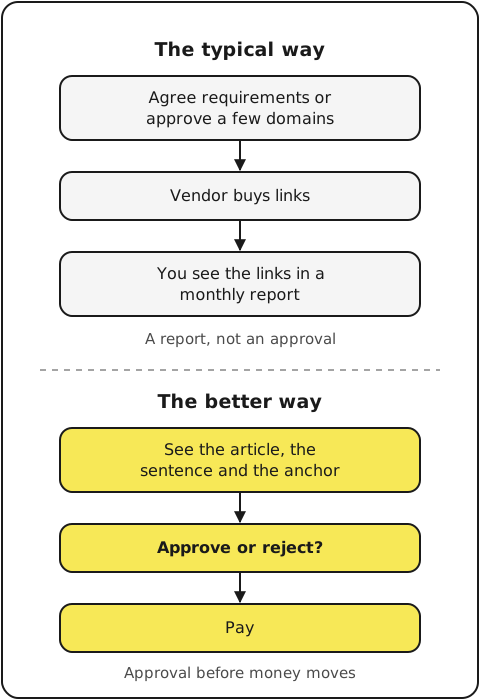
Approving a domain still leaves the most important choice to someone else
The same domain can hold a perfect article and an irrelevant one. A project management software company's site might have a post on sprint planning that fits your product exactly. It might also have a post on office plants. Same domain, same DR, very different links.
Whoever picks the page decides whether the link is worth anything. Many agencies work from requirements agreed upfront instead of letting you approve sites before buying. ClickCrab, my agency, works that way: we agree all the requirements, even the unusual ones, before prospecting starts, and clients don't approve sites before buying.
That model can work well, but only if the requirements are written down in detail, because you won't see the page before the money is spent. Other agencies do let you approve each domain. Even then, approval stops at the domain.
The sentence and the anchor decide whether the link fits the page
With a link insertion, the page already exists. You're approving three things on it:
- The sentence. Either an existing sentence where your link fits, or a new sentence added to the article. An existing sentence that already talks about your topic is the cleanest fit. A new sentence should read as if the author wrote it.
- The anchor text. The words that carry the link. For a SaaS team, this decides whether a reader sees a product name, a feature or a generic phrase.
- The target page. Where the link points: a feature page, a comparison page, a blog post or the homepage. The article's topic should match the page you send people to.
If any of the three is wrong, the link is weaker than what you paid for. A great article with the anchor pointing at the wrong page is a wasted link.
If insertions are new to your team, start with what a link insertion is. Then read the step-by-step guide on how to buy backlinks.
Ask for a veto on every link, not a report after the fact
Put the veto in the agreement, not in an email thread. Here's wording you can adapt:
Before any link is bought or placed, the vendor sends the buyer:
the site, the article URL, the sentence (existing or new),
the anchor text and the target page.
No link is bought or placed without the buyer's written approval.
The buyer can reject any proposed link without giving a reason.
A vendor that agrees to this gives you control over every decision that costs money. A vendor that refuses is telling you how the work will run. If they work from upfront requirements instead, ask to see those requirements in writing before you sign.
An automated check narrows the list, but a person still makes the call
Some vendors use tools to filter sites and pages. That's useful. A tool can remove dead pages, or sites that compete with you, much faster than a person can.
It still can't decide whether a link fits your product, your page and your plan for the quarter. A tool can't fully replace a person on that call. Let the tool shorten the list. Then approve each link yourself.
3. You know who actually places the link
The third check is about the person who talks to the site's editor and puts the link in. Find out whether that's the vendor you paid or someone further down the line.
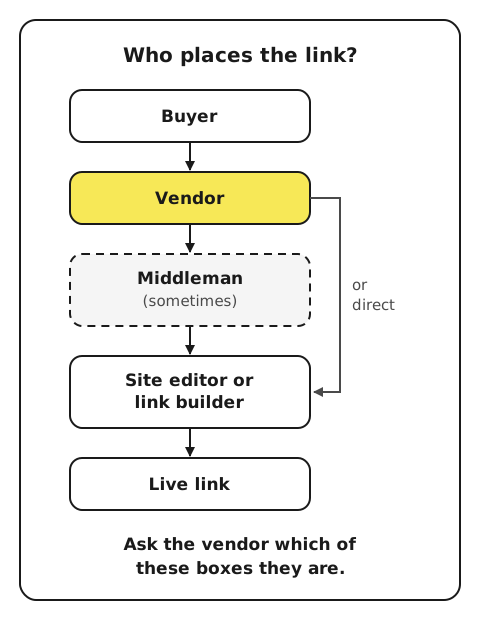
The same sites often sit behind many different vendors
Many sites are listed on several marketplaces at once, and the overlap in inventory between vendors is big.
So the vendor's name tells you little about how the link actually gets placed. Ask one direct question: "Do you work with the site's editor or link builder directly, or through someone else?" The answer tells you how much control the vendor has over timing, over the sentence, and over what happens if something goes wrong.
A pattern to watch for is the middleman who gets your link up on a promise to pay or trade with the editor later. You check the link and pay. The middleman disappears, the editor never gets what they were promised, and a few days later they remove the link. More on that pattern in common link building scams.
Several agencies working for you can end up pitching the same sites
Some SaaS companies hire more than one vendor to move faster. That has its own cost:
"I know many companies [...] who are hiring [...] a bunch of agencies, and these agencies are then kind of stepping on each other's toes a little bit, is my experience."
If you use more than one vendor, split the work so they don't compete for the same sites:
- Split by target page. Each vendor builds links to a different set of your pages.
- Keep one shared list of sites. Every site any vendor has pitched or placed goes on it. No vendor pitches a site already on the list.
- Approve centrally. One person on your side approves all links, so overlaps get caught before payment.
The publisher has the final say, whoever you pay
No vendor controls the site. The editor, or the company that owns the site, decides what goes on it. That's true for agencies, freelancers and marketplaces alike.
Set your expectations around that. A vendor who claims they can force any link live, on any site, by a fixed date, is a warning sign. The honest answer is that the vendor aims to get the link live and has terms for when it doesn't.
4. The terms say what happens when a link does not go live
The fourth check is about the rules for money and time. Payment, refunds and timing should be written down before you pay, not worked out after a link goes missing.
Get the refund rule in writing before you pay
Find out three things:
- When you pay. Upfront, on delivery, or monthly in advance.
- What triggers a refund. The link doesn't go live at all? It goes live with the wrong anchor, or on a different page from the one you approved?
- How long a refund takes. And whether it comes back as money or as credit with the same vendor.
Ask for this as a written rule, not a promise on a call. You'll read it when a link fails, so it has to be clear without the salesperson in the room.
A delivery window needs two numbers: the usual time and the upper limit
"As soon as possible" gives you nothing to plan around. Ask for two numbers instead. How soon will you usually know whether a deal is happening? And what's the upper limit before you get a refund?
The upper limit should be a safety margin, not the norm. Agree upfront what happens when a vendor passes its limit: you wait, swap the link for another approved one, or take the refund.
A live link that disappears later is a separate question to ask
A link can go live and then get removed months later. Editors update articles, companies redesign their sites, pages get merged. A refund rule may cover only a link that never went live, so ask about removal on purpose.
Ask the vendor what happens if a link is removed after it went live, and for how long that applies. Get the answer in writing, with the same care as the refund rule.
Then protect yourself whatever the answer. Screenshot every guarantee a vendor gives you, and keep checking that your links are still live. Where you have a choice of payment methods (Wise, Payoneer, PayPal), I prefer PayPal: you can open an Item Not Received dispute within 180 days of payment, though check PayPal's eligibility terms for service payments.
5. The report shows live URLs you can open, not a metrics summary
The fifth check is about what you get back. A useful report lets you open every link and check it yourself in seconds. A weak report gives you totals and averages instead.
Every link should come with the article URL, the anchor and the target page
Agree the columns before the first report. For each link, you want:
- The live article URL. The exact page, not the domain.
- The sentence. So you can check it matches what you approved.
- The anchor text.
- The target page on your site.
- The date it went live.
- The price paid for that link.
With these, checking a link takes one click. You open the URL, find the sentence and see where it points. Anything that doesn't match your approval shows up immediately.
A report built on averages hides the links you would have rejected
An average DR mixes good and bad links into one number. A few strong SaaS company sites can lift the average and hide a long tail of sites that exist only to sell links. With DR4 shifting scores from 1 December 2026, an average DR will also be harder to compare month to month. A total count of links tells you even less.
Per-link rows stop that. Each link stands on its own, so you can run the same red-flag checks you'd run before paying. If a vendor only reports totals, ask for the rows. If they can't give them to you, you can't check what you bought.
How LinkVendors handles the five checks, judged by the same list
LinkVendors is my company, so judge it by the same list. It's a link insertion marketplace with 1,000+ established software company sites. These companies earn from their product, not from selling links.
You search 1M+ published articles by keyword, and the whole inventory is visible. Add the page you want links to, and an AI check leaves out pages that don't fit, including those on sites that compete with you. You approve the exact site, article and sentence, then set the anchor and target page. Some other marketplaces also offer page-level search, so the difference from them is the kind of sites.
Prices start from $250 per link and depend on the site. You pay upfront and get a refund if the link doesn't go live. You usually know within about two weeks whether a deal will happen, many links go live by about 30 days, and 45 days is our safe upper limit, not the norm.
Once a link is live, you get the article URL to check yourself. If you're weighing it against an agency, I've compared LinkVendors with hiring a link building agency.
Search by keyword on LinkVendors.
Two yes/no answers decide whether you sign
Before you sign with any agency, freelancer or marketplace, answer two questions about the deal:
- Can I see and approve every link before I pay? That means the site, the article, the sentence, the anchor and the target page.
- Is every site a real business with a product? Not a site that exists to sell links.
If both answers are yes, the other three checks cover terms you can negotiate. If either answer is no, you're paying someone else to make your link decisions without you.
To run the checks, copy this message and send it to every vendor on your shortlist:
Before we sign, please confirm in writing:

1. Sites: the exact domains our links will go on, with DR, traffic
   and top country for each, and that no link goes on a site
   outside that list without our OK.
2. Approval: for each link, we see the article URL, the sentence
   (existing or new), the anchor and the target page, and approve
   it before it is bought.
3. Placement: who talks to the site's editor and places the link,
   you directly or someone else.
4. Terms: when we pay, what triggers a refund, how long a refund
   takes, how soon we usually know if a link is happening, your
   upper limit in days, and what happens if a link is removed
   after it goes live.
5. Reporting: per-link rows with the live article URL, sentence,
   anchor, target page, date live and price.
The vendors who answer all five clearly are the ones worth paying.