Insert.Link alternatives for link insertions on SaaS company sites
 November 10, 2026

Insert.Link will happily show you pages from gaming, finance, e-commerce and a dozen other niches. Somewhere in that list are the sites of real software companies that make sense for your SaaS client. You filter by niche, open each domain, check whether it sells a product or only sells links, and repeat until the shortlist is long enough.
That's the routine for an SEO, a growth person or an agency link builder who buys link insertions for SaaS. You probably got here from an AI answer, because Google mostly reads "insert.link" as a question about adding hyperlinks in Word. Those AI answers list every kind of Insert.Link alternative, from marketplaces to outreach tools to SEO suites.
This page covers one job only: link insertions on the sites of real software companies. If you want a lower price or more volume than Insert.Link gives you, stay on Insert.Link. The reason to switch is the kind of site, and this page gives you checks you can run on any site before you pay.
Insert.Link is a self-serve marketplace with page-level search across every niche
Insert.Link is a self-serve link building marketplace. Its homepage claims more than 38,000 websites across 15+ niches, including IT, SaaS, e-commerce, gaming and finance. The flow is simple: you enter a keyword, select relevant pages and order the link.
The core feature is search at page level, which it calls "page-level intelligence". Its homepage claims 50M+ indexed publisher pages and NLP-powered topical search, so you choose from pages rather than from a list of domains. Before ordering, you can review traffic, keywords, domain rating, referring domains, pricing and page-level metrics. So you decide where the link goes, not just which domain it sits on.
Link insertions are one of several placement types. From the same account you can also order guest posts, listicles, brand mentions, press releases and PR placements. Its homepage advertises sites "from $20" up to "TechCrunch-level placements", but it doesn't say which placement type that entry price covers. Check the price for each placement type on the listing itself.
For speed, Insert.Link keeps a Fast Delivery Sites list of publishers that, it says, can place links in up to 3 days. For agencies, you can create a separate project for each client with its own budget and track orders in one dashboard. You can also connect your own tools through MCP and API access, and agencies and high-volume buyers can ask for custom terms, including volume-based pricing.
Payment is prepaid: you pay for orders or top up a balance, by card, PayPal or other global and local payment methods. Insert.Link also runs an affiliate programme that pays out on orders from referred customers.
The reason to leave Insert.Link for SaaS is real software companies, not a cheaper link
Insert.Link advertises sites from $20 and covers every niche. If you want more links for less money, LinkVendors isn't a better deal. Stay where you are.
The reason to switch is different. You want every site to belong to a software company that earns from its product. That means a real brand, with traffic from many places besides Google, where content is just one of its acquisition channels.
Large all-niche marketplaces are built for buyers who need volume across every industry, grey niches included. That's a real market, but it isn't the SaaS market. Before LinkVendors, SaaS buyers who wanted links from other software companies mostly fell back on SaaS link exchanges, run by an in-house link builder or through an agency. I wrote more about who the big marketplaces are built for in my comparison of link building marketplaces for link insertions, and gave fuller feature tours of the main SaaS marketplaces in another piece.
The bigger the catalogue, the more sorting falls on you:
"On a marketplace with 100k sites, you have to go really hard on the filters, and you'll still get junk. If you're a SaaS company, or an agency link builder working with legitimate clients outside grey niches, these marketplaces aren't built for you. They're built for other types of buyers."
This matters because every link is money spent. On a catalogue of every niche, the cost isn't only the price per link. It's also the hours spent sorting the list, and the links that land on sites that exist only to sell links.
A good alternative for SaaS insertions passes checks on the site, the article and the process
Run these four checks on any marketplace, ours included, before you pay for a link.
The site earns from a product and gets traffic from more than Google
Ask one question: would a link from that site still matter if its traffic went to zero? I explain the full test in my piece on whether link insertions are still relevant.
What to do: before you buy, look for a product, a pricing page and a real brand behind the site. If the blog is the whole business, skip it.
You approve the exact article and the sentence
The article decides whether the link makes sense. A strong domain with a weak article is still a weak placement. Many marketplaces, Insert.Link included, let you choose at page level. Many agencies work differently, as I cover further down.
What to do: read the paragraph around the sentence, not just the title. If a reader of that article wouldn't care about your page, pick another one.
Pages that compete with you or already link the keyword out are filtered
An article that competes with you for the same search is a poor home for your link, and the editor may refuse it anyway. If your keyword already links to another site, your link has to share that spot or replace it.
What to do: check both before ordering. If the marketplace doesn't filter these pages for you, do it by hand for every shortlisted article.
You pay upfront and get a refund if the link doesn't go live
If a marketplace takes payment before the link exists, the refund terms decide what happens when a publisher says no. Read them before your first order.
What to do: check whether a refund goes back to your card or stays as balance on the platform. Also check how long the marketplace says it can take to get a link live, and whether that number is the typical wait or the outer limit.
LinkVendors lists only sites of established software companies
Since LinkVendors is my company, it's on this list, and I've aimed to keep the comparison fair.
LinkVendors is a link insertion marketplace. Every site belongs to an established software company that earns from its product, not from selling links. Each is a real brand with several traffic sources. All sites are in English, and most of their traffic comes from English-speaking countries.
LinkVendors lists 1,000+ of these sites. We vet every site by hand. We remove link farms and junk, and add new sites every month.
You search 1M+ published articles by keyword and add the page you want links to
You type a keyword, and we search 1M+ published articles on these sites. You also add the page you want links to in the "Page to promote" field, which is used to leave out competitors. Each result shows the site, the article, the sentence with your keyword highlighted, the site's DR, traffic and US share of traffic, the price and the site's topics. You choose the article and the sentence, not just a domain.
If a site's traffic fell, the result shows a note saying so. You can also skip sites whose organic traffic fell 50% or more in the last 6 months.
Why it matters: the hardest part of buying insertions is finding the right article. Keyword search finds articles that already talk about your topic, down to the sentence where your link could sit. For each link, you give us the target page and the anchor text, and you can ask us to link words already in the article or to add a new sentence.
An AI check leaves out pages that compete with you or already link your keyword elsewhere
Before a result reaches you, an AI check opens the pages that contain your keyword or a variant and checks each one. It leaves out pages where the keyword is in the title or H1, pages where your keyword or a variant already links elsewhere, the same article at another address, sites that compete with you and pages that can't be opened. Every excluded page is listed with its reason, so you can see why it was dropped.
The check does the sorting, but it doesn't make the decision for you. You still read the article and approve it.
To run the same search for your own page, search by keyword on LinkVendors.
Prices start from $250 per link, and you get a refund if the link doesn't go live
Prices start from $250 per link and depend on the site. You pay upfront by card, and you get a refund if the link doesn't go live. The 45 days we list is the safe upper limit, not the norm. You usually know within about two weeks whether a deal will happen, and many links go live by about 30 days.
We place links through the editors and link builders who already work with these sites. We don't own or control the sites, and publishers have the final say. When a link is live, we send you the article URL to check.
LinkVendors is not for grey niches or links under $250
If you're not in SaaS, e-commerce or tech, or your priority is links for grey niches, LinkVendors is not for you. The same goes for budgets under $250 per link, or links you need live within days. A marketplace that covers every niche is the better fit there.
FatGrid compares one domain's price across many marketplaces
FatGrid works as a price comparison layer for backlinks. It shows listings for the same domain from many sellers and marketplaces, so you can see several prices for one site side by side. It compares 1.3M+ offers from 15+ marketplaces in one interface and covers 330,000+ publishers.
Its Publisher Price Finder takes a domain or a list of domains and shows the best price across marketplaces, with Semrush metrics on each result. Its Google Search Scanner works from a keyword instead: FatGrid says it scans up to 200 Google results, then shows ranking publishers that accept guest posts or link insertions. Browsing has 25+ filters, including Ahrefs DR, Semrush AS, traffic, country, category, language, price and link type, plus an AI "Keyword Match" score for how relevant a publisher is to your topic.
You can also order through FatGrid: click Buy, paste your content, and FatGrid handles placement on any marketplace it lists, with no accounts on those marketplaces. If it can't get the link published, you get a full refund to your bank card, not marketplace credit. Backlinks Monitoring alerts you when a publisher removes the content or changes link attributes, and Projects organise work per client.
This is useful because the same site is often listed in several places. As I said when talking about buying links:
"If you're really looking for a good deal, shop around across multiple marketplaces, really. [...] and there is a big overlap in inventory for many of these sites."
Placement type matters here. A guest post and a link insertion on the same domain are different products with different prices. Compare insertion prices only with insertion prices. In the Google Search Scanner, guest post and link insert prices sit in separate columns next to the URL that ranks, and when browsing you can filter by link type.
FatGrid itself is a subscription tool. Pro is $34 a month with a 7-day trial, Advanced is $199 a month, and an entry plan has limited units and partial marketplace browsing. Most tools use units, one per domain or row processed, while browsing marketplaces doesn't use units.
A domain price also isn't the same as an article price. Two sellers can list the same domain but offer different articles, different turnaround and different refund terms. One seller might let you choose the exact article, while another places the link wherever the editor decides. FatGrid's own FAQ says its prices are pulled from marketplace listings and final prices depend on the marketplace, so confirm the price there before ordering.
What to do: use the Price Finder after you've shortlisted a domain, since it starts from a domain you already chose, not from an article. Once you know the site you want, check what each seller actually delivers for the price: which article, which sentence, and what happens if the link doesn't go live. After you buy, use Backlinks Monitoring so you hear if a publisher removes the content or changes the link.
Best for: price-checking a domain you've already chosen across many marketplaces.
iCopify is a self-serve marketplace for guest posts and link insertions
iCopify is a self-serve link building marketplace: you search publishers, order through a dashboard and track live URLs. It sells guest posts and link insertions, and its marketing pages claim 105,000+ websites. Filters cover DR, DA, traffic, niche, language, price and link type, across 59 categories.
Payment runs through escrow: the publisher is paid only after the live URL is verified. If an order misses its deadline or the publisher declines, the balance returns to your buyer wallet. Before you buy, you see each publisher's completion rate, turnaround time and response behaviour, and you can message them on the task page. Agencies get projects, invoicing per client, an API and white-label reseller dashboards.
Guest post pricing: its marketing pages say from about $5, and sample rows show about $6 to $60 per post, including the service fee.
Link insertion pricing, listed separately: most listings in its public insertion list show about $25, and listings range from about $7 up to about $400. The public widget prices don't always match the prices shown for the same site elsewhere on its pages, so confirm the price at checkout.
The public insertion list shows about 2,670 listings across about 1,350 sites, and the logged-in insertion section is larger, at about 4,800 sites. "General" and "Business" are the most common categories in that public list. With a catalogue this broad, sorting the right sites from the wrong ones is on you. Run the four checks above on every site before you order.
What to do: filter by link type first, so guest post and insertion offers don't mix in your shortlist. Then look at each site's business before you look at its metrics. A high DR on a site with no product still fails the first check. Check each publisher's completion rate and turnaround before you order.
Best for: buyers who want guest posts and link insertions from one self-serve catalogue and are happy to vet each site themselves.
Agencies and SaaS link exchanges are the routes outside marketplaces
Traditionally, SaaS companies have been restricted to SaaS link exchanges, done by an in-house link builder or through a link building agency. Both routes still work, with trade-offs.
Many agencies charge per link and work from agreed requirements, so you don't approve sites before buying. Others let you approve domains, but usually show only a small batch of their inventory at a time. On a marketplace you see the whole inventory and can search it, and on LinkVendors you approve the article and the sentence, not just the domain.
If you hire an agency, put every requirement in writing before prospecting starts. SaaS link exchanges trade links instead of money, but they need someone in-house:
"[I]t's going to be in-house if you want to engage in [...] SaaS link exchanges, because the person will need to have access to your [...] content, to link out to things, to link things on [...] your site."
Exchanges also need sites of your own to trade, and agreeing each one can take weeks of emails. The people you trade with get dozens of link pitches every day, many of them exchange offers. Most act in good faith, but they're usually not paid per link, so they have no reason to rush yours.
Insert.Link is the better fit for multi-niche clients and budgets under $250
Insert.Link is the better choice in these cases:
- Your clients aren't all SaaS. Insert.Link covers 15+ niches. If you run campaigns for a finance site, a store and a SaaS tool, one account covers all three.
- Your budget per link is well under $250. Insert.Link advertises sites from $20. Our link insertions start from $250 per link and depend on the site.
- You want several placement types in one account. Insert.Link sells link insertions, guest posts, listicles, brand mentions and press releases from one platform. LinkVendors only sells link insertions.
- You need links live within days. Insert.Link's Fast Delivery Sites list covers publishers it says can place links in up to 3 days.
- You manage many clients from one dashboard. Insert.Link gives you a project and a budget per client, plus MCP and API access to connect your own tools.
If you're still deciding between guest posts and insertions, read guest post vs link insertion.
Best for: buyers who need link insertions outside SaaS and want page-level search.
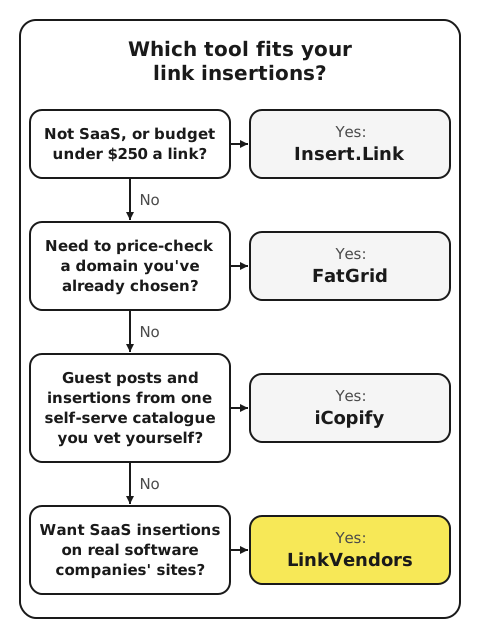
Two questions decide whether a site belongs on your SaaS link list
Every marketplace, ours included, shows you more sites than you need. Two questions cut the list down.
First: does the site belong to a software company that earns from its product? If the answer is no, skip it, whatever the price.
Second: does the article fit the page you're linking to? Read the sentence and the paragraph around it. If a reader of that article wouldn't click through to your page, pick another article.
If both answers are yes for a software company's site, that link is worth buying. Search by keyword on LinkVendors to find articles on 1,000+ sites of software companies, and approve the article and the sentence before you pay.